Update Bank Details in SASSA – (Get Instant Bank Update) 2026
Conflicting or Outdated Bank Details are the common reasons for delays and rejections of SASSA SRD Grants. Therefore, this article will provide a verified step-by-step method on “How to Update Bank Details in SASSA?”
From providing incorrect details to switching to a new bank, and changing account types, several Bank-related activities can cause unwanted delays in SASSA Payouts, especially when applicants perform them without informing the authorities.
However, the good news is that the SASSA Online Portal allows nationwide applicants to change and submit new bank details without hassle. After updating, the authorities verify your information with the bank before approving payment changes.
How To Update SASSA Banking Details Online
SASSA beneficiaries find it the easiest and quickest way to update their banking details online. In a few minutes, you can complete the entire process. All one needs to do is go through the steps outlined below
- Visit the SASSA official site with your browser.
- Click the home page option to log in.
- When you are in your account, enter your password and username.
- Create an account using your ID number and grant programs if you are a new user.
- After logging in, visit the banking details section on the profile.
- Secure the identity verification processes required by SASSA.
- Enter the name of your new bank, bank code, account number and account type.
- Check all banking information twice to ensure it is correct.
- Click on Submit and save your information.
- Wait until SASSA has processed and verified your new details in a couple of days.
- This should be followed by a confirmation that you check your email or SMS to confirm that your banking details have been updated.
Things To Follow When Changing Bank Details
Updating your SASSA bank details is crucial, and you should take precautions to avoid delays or problems when making payments. Having these main points in mind will make you update your details without any hassles or accidents.
Use Only the Official SASSA Website
False websites and perpetrators often attempt to steal grant applicants’ banking information. When accessing the official site, it is safe to assume that your data is used correctly and that it runs properly.
Enter Your Details Carefully
You can wait weeks before you can get paid because of typing errors in the account numbers or branch codes. Be slow when entering your new details, and ensure you read and reread before entering.
Use a Bank Account Registered in Your Name
To prevent fraud, SASSA accepts only personal accounts linked to your ID number. Checks by family members, friends, or spouses will not be accepted immediately. Keeping your grant in your own account is the way to go, as it will improve the verification process.
Confirm Your Changes After Submitting
Always log in to the SASSA portal after updating your details, and ensure the new information is displayed correctly. This straightforward check will reduce deadbeat payments in the following cycle.
Wait for Confirmation Messages
After SASSA processes your new bank details, they typically reply via SMS or email. Do not panic, these verifications can take a couple of days. Once you receive confirmation, your next payment will be credited to the new account.
Platforms to Update Your Bank Details
SASSA offers several convenient options for beneficiaries to update their banking information without wasting much time. These technologies simplify the process for individuals with and without internet facilities. If you have already approved grant, then perform the SASSA Status Check and get the exact payment date.
Update SASSA Banking Details From SASSA Call Centre
If you are offline or would rather speak to a call centre representative, using the SASSA call centre to update your banking details is a sure way to do so. It can be done without the difficulty one may feel when taking action online.
- Dial the SASSA helpline 0800 60 10 11.
- Select the opportunity to communicate with a customer care representative.
- Speak to the agent and state that you wish to amend your SASSA banking details.
- Please provide your South African ID number for verification.
- Enter your type of grant, i.e., SRD, Child Support or Disability grant.
- Indicate your new bank name, branch code, account number and account type clearly.
- The agent reads your information to ensure that they understand it well.
- Fix all errors as soon as the agent overlooks something.
- Enquire with the agent about the time required for the update.
- Having your phone close, you will receive any SMS confirmation from SASSA.
Update SASSA Banking Details From SASSA Email
You can use the SASSA official email to update your banking details if the online portal is unavailable to you or if you do not want to make calls. It might be slower than online updates, but it is also a secure and accepted way to update your details.
- Your email application or browser opens, and you can create a new email with a click on Compose.
- Refer to the official SASSA email [email protected].
- Form the subject foil to be written as ‘Banking Detail Change Request’.
- When introducing oneself, presentation of full name and South African ID number is required.
- Indicate the nature of the grant you have, such as SRD or Child Support.
- Write down your new name of the bank, the bank code, the account number and the account type.
- Add documents where necessary, e.g. a bank statement or confirmation letter.
- Make sure that you have checked your information twice before sending an email.
- Send it and wait for SASSA to respond, giving more instructions.
- Keep checking your mailbox to see whether you have received the confirmation or if they have asked you to provide more documents.
Update SASSA Banking Details From SASSA Postal Mail
If you do not have access to the internet or the ability to call the SASSA centre, you can send your banking information by post. This is slower, yet it will enable beneficiaries in far-flung locations to effect changes safely.
Update SASSA Banking Details In-Person
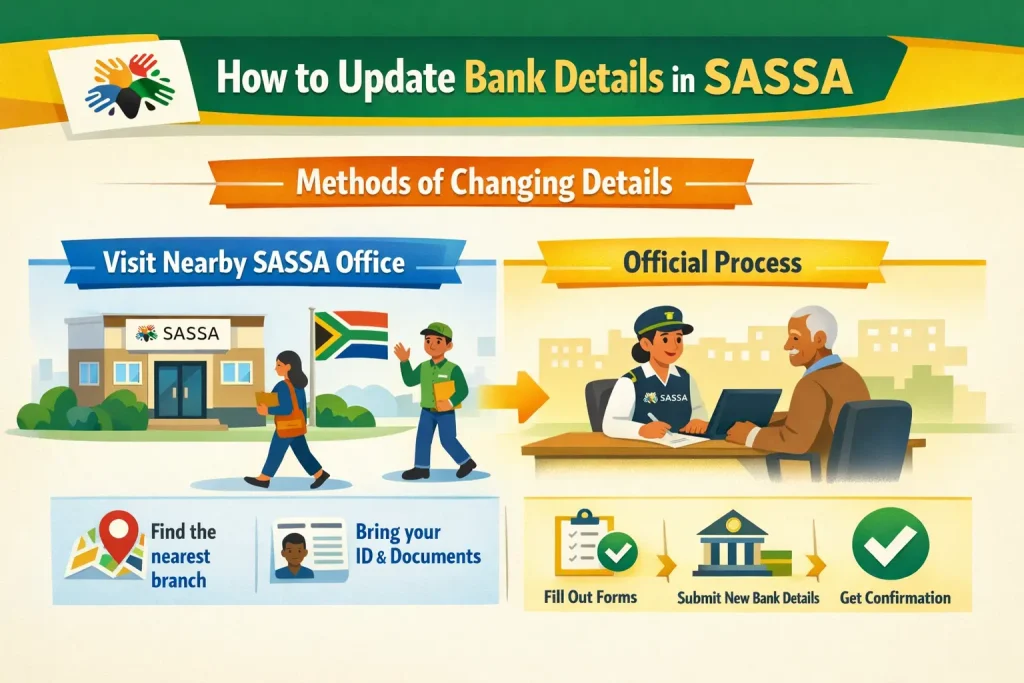
If you need personal support or a piece of paperwork, visiting one of the SASSA offices to update your banking information in person is the best option. The technique proves particularly beneficial for individuals with difficulty using the internet or making calls.
- Take your South African ID, your SASSA card and any documents from your new bank.
- During working hours, see your closest SASSA regional office.
- Queue/purchase a ticket to speak to a SASSA officer.
- Inform the officer that you require your banking details to be updated on your grant.
- Give the name of your new bank, branch code, account number and account type.
- Please provide your supporting documents.
- Hold on while the officer enters your new details into the system.
- Before they update the information they have been capturing, read carefully the details they have secured.
- Request that they ensure your information has been updated.
- Remember to keep your phone with you in case SASSA makes any changes by SMS.
How to Switch Your SASSA Bank Details
You would have to change your bank account with SASSA if you open another account or wish to use a more convenient bank. When you do this right, you will not miss any payments or fall behind in receiving your grant.
- Make sure that your new bank account is operational.
- Prepare your ID, antique OLD SASSA account information and new bank papers.
- Concur on the favourite way of updating the details (online, call centre, email, postal communication, or face-to-face).
- Log in or contact SASSA through the platform of your choice.
- Provide the name of your new bank, the bank branch number, the account number, and the account type.
- Provide any supporting documentation that is asked to be verified.
- Confirm only after verifying any form of information.
- Keep waiting until SASSA confirms your new bank details.
- Keep track of your next grant so you can guarantee posting it to the new account.
- It would be good to keep your old account open temporarily until the switch is fully established.
Account Proof to Check SASSA Bank Details
You must come with evidence of your account to update or verify your SASSA bank details. This will ensure that SASSA can manage your information and eliminate any mistakes in grant payments. The process is fast and safer with the necessary documents in place.
Bank Statement
The first evidence of the account is a bank statement with your full name, account number, and branch code. It shows that the account is active and it is yours. It is important to note that the statement must be up to date to avoid delays in checking.
Bank Confirmation Letter
Another type of proof that can be considered credible evidence is a letter issued by your bank that lists your account information. Your name, account number and branch should be included in the letter.
Bank-Encoded Deposit Slip
You can also provide proof of your account by a bank-encoded deposit slip. It displays your account number and branch code as provided by the bank. Possess a copy of the same when giving new details to SASSA.
Copy of Bank Card
To provide supportive documentation, you can provide a photocopy of your bank card with the name and account number partially obscured. Do not include any personal data, including PIN/CVV. This assists SASSA in verifying that this is really your account.
Tips to Protect Your SASSA Account Details
The safety of your SASSA account information is paramount to preventing fraud and ensuring you receive your grants in full. A large proportion of beneficiaries waste money due to the negligent management of bank data.
Never Share Your PIN or Password
Online banking passwords and bank PINs should always be private. Learn them by heart rather than write them or tell anybody. This information will never be requested by SASSA or the banks, either by telephone or email.
Monitor Your Account Regularly
Fraudsters also drain bank accounts, so verify the statements regularly to ensure there are no suspicious withdrawals or transfers. Check every transaction and report any inconsistencies. Housekeeping will help to avoid additional abuse of your money.
Use Secure Devices
There must always be a trusted personal computer or phone that you use to access the banking details. Do not use common computers or devices that may contain malware. This will decrease the possibility of hacking or data theft.
Set Up Alerts
Enable SMS or email alerts for every account activity to be notified of any changes. You are alerted to deposits, withdrawals, and suspicious transactions in real time. This serves as an additional layer of security for your SASSA account.
Report Suspicious Activity Immediately
Report it immediately if you detect anything suspicious on your account or if you have been contacted by suspicious emails or calls. Call your bank and SASSA immediately. Are you wasting your grant money?
Check if Your SASSA Account Details Are Compromised
You should also check your SASSA account regularly to see whether someone is using it on your behalf. This can be achieved by detecting and reporting suspicious activities in time, with just one or two very easy steps.
Monitor Bank Statements Closely
Check the bank statements regularly to ensure there are no unusual withdrawals or transfers. Check the credit amounts you did not object to or check the money to new addresses. Procedurally, early timing averts additional abuse of your grant funds.
Check Transaction Notifications
For all account activities, ensure your SMS or email notifications are on. Under any circumstances, any illegal transactions will trigger an alert so that you can respond in time. Notifications serve as an up-to-date security procedure on your SASSA account.
Confirm Payment History
Confirm your grant payment record at the portal of SASSA or at your bank. Unpaid or unequal payments may result from unwarranted access. The cross-check will help ensure you get the correct quantities at the appropriate time.
Be Alert to Unusual Communication
Be aware of suspicious phone calls, emails, messages, and so on that purport to be sent by SASSA or your bank. Awareness is important in protecting your account, as scammers often play an instrumental role in enabling illegal, unwarranted access.
Report Immediately if Suspicious Activity is Found
In case there is an abnormality, call SASSA and your bank as soon as possible. Provide information on the suspicious transactions to be investigated. Early reporting is intended to facilitate greater compromise and ensure you receive your grant payments.
Payment Issues After Changing SASSA Account Details
In certain cases, the funds may take time to clear even after you provide your banking details, or they may not appear in your account. Various organizations handle different aspects of your grant payment, and it is essential to contact the right one.
Your Bank
If your grant doesn’t reflect in your account, contact your bank first. They can check whether the payment was received or whether there were errors during processing. Banks can also verify whether account information has been keyed in correctly on their side.
SASSA Support
SASSA has also provided support lines and offices where issues related to grant payments can be addressed. Give them a call to find out whether your new banking information was entered successfully.
South African Post Office (SAPO)
Should you wish to have grants deposited to you via a SASSA card or a Postbank account, your transactions can be verified by SAPO. They might ensure the money was loaded correctly and report any issues with your account.
Keep All Relevant Documents Handy
When calling any of these organizations, the ID, grant details, and evidence of changed bank details should be available. This enables them to help you fast and to the point. Effective documentation accelerates the problem-resolution process in payments.
Check if Your SASSA Account Details Are Updated
Once you have submitted your new banking details, it is important to ensure that SASSA has updated your details accordingly. This is done by reviewing the account information at least once a month to ensure your payments are safe.
Check Online via SASSA Portal
Go to the SASSA website, log in to your account, and proceed to the Banking Details section. In this case, you can check whether your new account details have been recorded successfully. It is the most convenient way to ensure your updated information is correct.
Call SASSA Support
Dial the SASSA call centre at 0800 60 10 11 to verify your banking information. A representative can also check the system to verify whether the updates have been documented. This technique comes in handy when you have no internet access.
Visit a SASSA Office
You may also visit the closest SASSA regional office to have your new banking details validated. Your recipient profile will be printed with saved account details, which staff can print after verifying your identity.
Check SMS or Email Confirmations
SASSA can send an email/SMS that confirms that you have updated your banking details. These messages should be read and kept in case. Confirmation messages are another indication that your grant payments will be made accordingly.
Conclusion
In short, It is also advisable to update your SASSA bank accounts to ensure your grant is paid to the correct account on time. Accuracy and verification are important, whether it is through online updates, phone, email, postal mail, or even a personal visit. Regularly checking and protecting your account helps keep your money and your calm mind safe.
On the sidelines, bookmark our website and push the notification icon to receive an alert whenever we publish a new article or blog related to the SASSA SRD R370.
FAQs
Time Required to Verify SASSA Bank Details?
After you provide your new banking information using one of the methods, SASSA needs time to check and enter it into their system. The time required to verify varies depending on the platform used, and updates over the internet take the least time.
How long does it take for SASSA to update my banking details?
Online updates require 3-5 working days, call centre updates require 5-7 working days, and email or postal mail can take up to 10 working days.
Can I use someone else’s bank account for my SASSA grant?
No. SASSA does not pay grants when the accounts are registered in the beneficiary’s personal name to avoid fraud with the securities provided.
What documents do I need to update my SASSA bank details?
You might be expected to bring a recent bank statement, a bank confirmation letter, a bank-encoded deposit slip or a copy of your bank card with name and account number.
What should I do if my SASSA grant is not paid after updating my bank details?
First, make sure your bank has been paid. Contact SASSA support or your local SASSA office to check and handle.